One Plan. One Date. Debt-Free. 🎉
Turn every credit card and loan into one plan with one date on it: the day you're debt-free. Cake Budget does the payoff math, sets your extra payment aside on payday, and rolls your momentum forward every time a debt disappears.
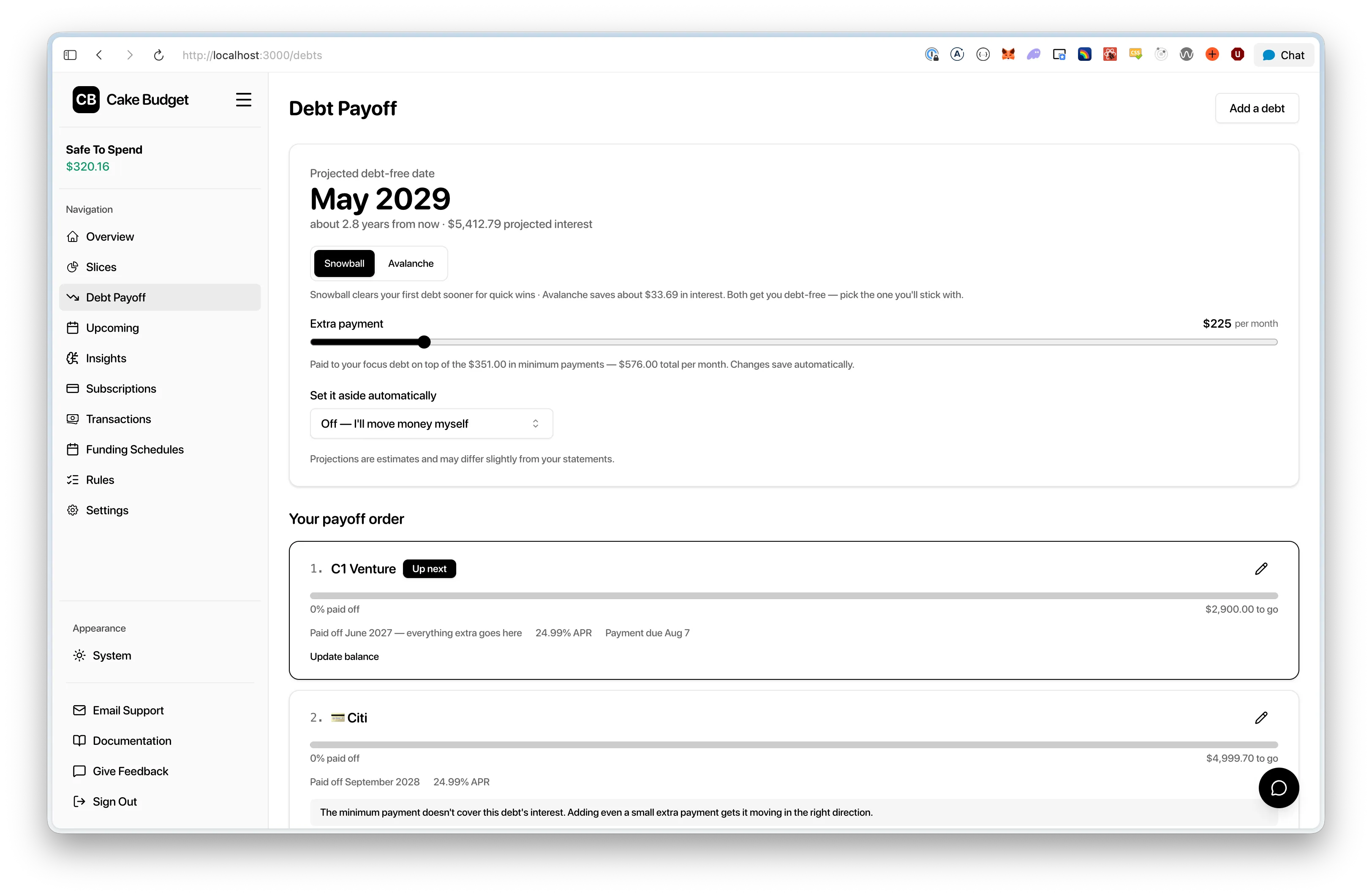
The headline is your projected debt-free date. Below it: your strategy, your extra payment, and every debt in payoff order — each with its own progress bar and projected payoff month.
Why Debt Plans Go Stale
Spreadsheet Fatigue
Our solution: Add your debts once — the plan does all the math forever
Stale Balances
Our solution: Linked credit cards sync from your bank automatically
Which Debt First?
Our solution: A clear payoff order with the tradeoffs in plain numbers
Motivation Fades
Our solution: Visible wins, rollover momentum, and zero shame
The hard part of paying off debt isn't the math — it's staying engaged for the months it takes. Cake keeps the plan current and the wins visible, automatically.
A Payoff Plan That Maintains Itself
A Real Debt-Free Date
The plan simulates your debts month by month — minimums, interest, and your extra payment — and puts one date on screen. It updates live as you adjust.
Balances That Update Themselves
Link a connected credit card and the amount you owe syncs from your bank. When it hits zero, Cake notices on its own — and celebrates.
Snowball or Avalanche
Snowball by default for fast, visible wins. One tap switches to avalanche, with the cost of each choice shown in dollars and months.
An Extra Payment That Moves Itself
Your extra payment is set aside for the focus debt on payday — before it can be spent. Split it across paychecks or take it from one.
Momentum That Rolls Forward
When a debt is paid off, its minimum plus your extra payment roll onto the next debt automatically. Your attack grows every time you win.
Ask Cake About It
"When am I debt-free?" "Which debt should I pay first?" The AI assistant answers from your actual plan — real numbers, no hand-waving.
Set It Up in 10 Minutes
Add Your Debts
Link connected credit cards so balances sync from your bank automatically, or enter what you owe with one tap. Skip any field you don't know — APR and minimums can come later.
Pick Your Strategy
Snowball (smallest balance first) is the default because quick wins keep people going. Toggle to avalanche any time — the plan shows exactly what each choice costs and saves.
Set Your Extra Payment
Drag the slider and watch your debt-free date move. Think per month or per paycheck — whichever matches your brain. Changes save automatically.
Automate It
Choose your paycheck schedule and your extra payment is set aside for the focus debt on payday — before it can be spent. When a debt hits zero, everything rolls to the next one on its own.
Snowball or Avalanche — Your Call
Both get you debt-free. The plan shows you the honest tradeoff so it's an informed pick, not a guess.
Snowball Default
Smallest balance first. Your first debt disappears fast, and behavioral research is clear: that early, visible win is what keeps people paying off debt.
Best for: most people
Avalanche
Highest APR first — the mathematically optimal order that minimizes total interest. One tap away, with the savings shown in dollars and months.
Best for: rate-focused optimizers
Deliberately conservative math: interest projections are always rounded against you, so real statements should come in at or under the plan. This is a plan you get to keep beating.
Built Without Shame
Debt tools love alarm bells: red badges, "PAST DUE," "action required." Research shows where that leads — stress, avoidance, abandoned plans. Cake's debt experience is deliberately different.
Reminders Inform, Never Alarm
Payment reminders arrive a few days ahead and lead with the good news: "You already have $200 set aside — that covers the minimum."
One-Tap Check-Ins
Manually tracked debts get a gentle monthly "still about $X?" check-in. One tap to confirm — and it never escalates if you ignore it.
Help, Not Scary Numbers
If a debt's minimum can't outrun its interest, you get a supportive suggestion — never a fictional 40-year payoff date.
Progress Framing Everywhere
Per-debt progress bars, a permanent "Paid off" list, confetti and a congratulations email when each debt clears.
You're doing something hard. The app's job is to make the next step obvious — and to throw confetti when you get there. 🎊
Not a Separate App Bolted On
Each debt is a slice, so payment money is set aside like any other envelope, counts against your Safe-to-Spend, and works with funding schedules and rules you already use. One system, no double bookkeeping.
Your Money Stays Yours:
Cake sets your extra payment aside automatically, but actually paying your card or loan stays with you — Cake never initiates payments from your bank.
Your Debt-Free Date is 10 Minutes Away
Add your debts, pick a strategy, and let the plan do the rest. Debt Payoff is included in every plan — getting out of debt shouldn't be a premium add-on.
No credit card required • Included in every plan
Debt Payoff FAQ
Does the plan move my money automatically?
It sets money aside automatically — into the debt's envelope, on payday, if you enable automation. Actually paying your card or loan stays with you. Cake never initiates payments from your bank.
Do I need my exact APR and minimum payment?
No. Missing APR is treated as 0%, and a missing minimum gets a typical assumption — the plan tells you when it's assuming. Add real numbers whenever you're ready to sharpen the projection.
What happens when I pay off a debt?
Confetti, a congratulations email, and a permanent spot in your "Paid off" list. Then the freed-up minimum payment and your automated extra payment roll onto the next debt in your order — no reconfiguration needed. That rollover is why payoff accelerates over time.
What if my card balance goes up?
The plan recalculates from the real balance, adjusts the payoff order if needed, and carries on. No lectures.
Can I put extra money on a debt that isn't the focus?
Of course — it's your money, and any payment helps. The plan simply concentrates the automated extra where it sustains momentum best.
Which plan do I need for Debt Payoff?
Any of them. Debt Payoff is included in every plan — Starter, Budget Pro, and Family — and during the free trial.
Want the full picture? Read Debt Payoff Explained or the step-by-step setup guide.